

What if you could walk through a language model instead of treating it like a black box? DIYLLM is a small and readable DIY language model implementation written in Java and pair programmed with an LLM that allows you to trace every step in the code, from tokenization to probabilistic text generation.
Being a a small inspectable language model, DIYLLM helps you understand how today’s large language models work under the hood. Designed as a wiki-in-code, it can be explored starting from the main method, much like following a wikipedia article’s hyperlinks, making the entire training and generation pipeline transparent and open for experimenting, not least because of its modular design.
For the impatient reader: If you prefer doing over reading, let’s skip the philosophy and get DIYLLM up and running right away. You can study the motivation and background later. Make sure the required tooling is installed and readily configured, being Git, Apache Maven and the Java Development Kit (JDK) with a version >= 23. Enough of the many words, here we go:
1
2
3
4
5
6
7
8
9
10
git clone git@bitbucket.org:funcodez/funcodes-diyllm.git
cd funcodes-diyllm
mvn clean package
./diyllm.sh --help
./diyllm.sh -v train src/test/resources/gnu.txt
./diyllm.sh -v generate "Using a complete Unix-compatible program"
./diyllm.sh -v generate "Software tasks for up-to-date"
./diyllm.sh -v interactive
./diyllm.sh -v inspect diyllm.dat --schema --limit 100
./diyllm.sh -v --init
Instead of using the
diyllm.shbash script, Windows users can rundiyllm.ps1ordiyllm.cmd, depending on their environment and preferences 1. Alternatively, you can start the application directly withjava -jar ./target/funcodes-diyllm-x.y.z.jar, adjusting the JAR version as needed.
From Hacker nights to LLM pairing
In the 80s and 90s, I read books like PC Intern 2.0 and Hackerbibel as well as articles in computer magazines and borrowed literature from the school library to understand how things worked and get up and running. There were almost no experienced people around to guide us, so a friend of mine and I figured out how to program first in BASIC2, in Turbo Pascal3 and Assembly4 on our own. We explored system call internals by debugging, experimenting, running into errors and patiently filling the white spots in our mental maps of knowledge.
Back then, gathering the knowledge required to build something like DIYLLM would have taken countless days of hard investigation, a steep learning curve and plenty of trial and error. Developing DIYLLM, in contrast, took only a few days. The trade-off however is that understanding often comes after implementation, along with the uncertainty of not fully grasping every detail and the risk of overlooking significant issues and misunderstandings resulting in consequential errors.
The feeling of discovering things together with friends who were excited about the same topics slowly faded over the years: Corporate life taught me that professionals were often not interested in building cool things together. Instead of teaming up, good ideas were often dismissed with plenty of talk but little substance and without any viable alternative, often only to be taken up again later in one form or another.
So pairing up with an LLM to build DIYLLM felt surprisingly familiar. It felt like having a counterpart again, teaming up to turn inspiring ideas into working systems, pushing things forward and solving problems instead of protecting imagined territory. It felt as if the LLM and I were discussing how to evolve the project and search for the best solution, regardless of whose idea it was.
Pairing up with an
LLMsparked something I had not felt in a long time: Coding as part of a good team can be genuinely exciting. And that feeling I once had while hacking away with my friends came back.
Disecting the DIYLLM architecture
As a software architect, I focus on a modular design and clear architectural boundaries. I ensure that exposed interfaces are solid so the code behind them can be improved or corrected when necessary5. Tests operate on these interfaces, so I am satisfied when the black box behind them behaves as expected and the implementation remains readable and well structured. In this project, many of the algorithms were produced with the assistance of an LLM, exposed by the aforementioned interfaces.
Welcome to the emerging world of LLM assisted coding! Although everything is backed by unit tests, the algorithms generated by an LLM may still contain (subtle) flaws. Here is the twist: The tests were written by the LLM as well! A word of warning: For critical code (all production code is critical code) make sure you fully understand the code as well as the tests and make sure they cover the good, the bad, the ugly and the edge cases! I am still working on that. So any flaws are ready to be uncovered and refined as you explore DIYLLM and submit pull requests!
The DIYLLM building blocks
The DIYLLM application is written in Java, a more verbose programming language and therefore best suited for educational purposes and both its source code and Javadoc are designed to be explored like a navigable code wiki. Starting from the CLI, the architecture unfolds in clearly separated layers.
The Main class acts as the CLI driven controller and delegates commands to its thin Service layer. The service exposes the main functions of the system: train, generate, interactive and inspect.
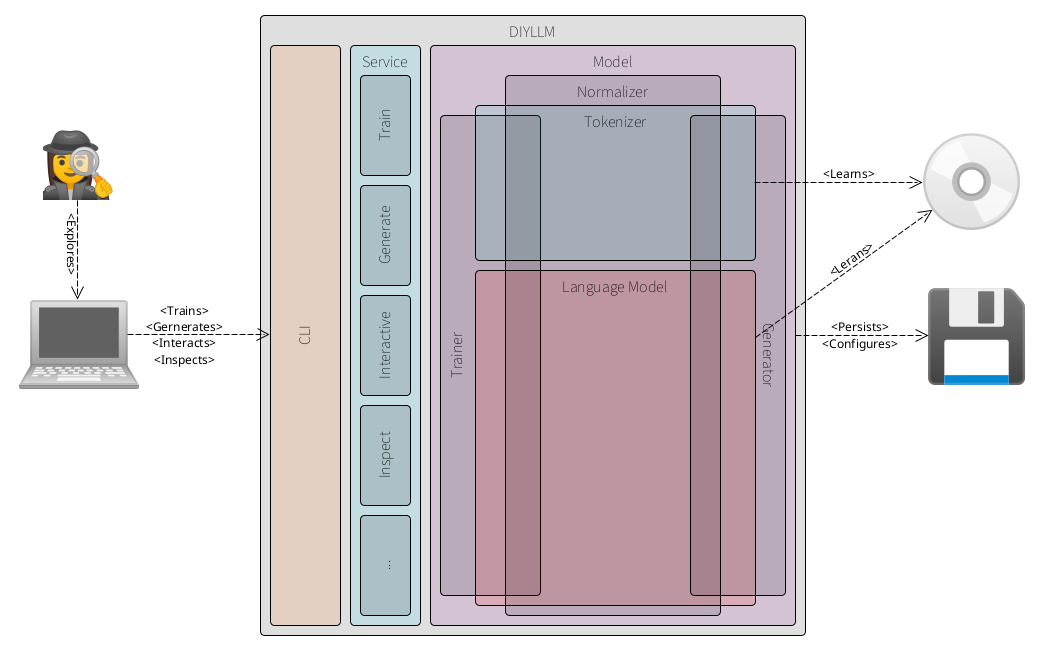
At the core sits the Model which combines an exchangeable Tokenizer and an exchangeable LanguageModel, both using the same Normalizer. The Model is also responsible for persistence. Training is handled by the Trainer. It uses the Tokenizer to build the vocabulary and the LanguageModel to learn the statistical model, all operating on normalized input. Generation is handled by the Generator. It uses the Tokenizer vocabulary and the trained LanguageModel to process prompts and produce output, again alongside the Normalizer. Inspection operates on the Model to expose information about the tokenizer’s vocabulary and the internal state of the language model.
Explore the DIYLLM application
To explore DIYLLM yourself, clone the repository and build the project locally. Before you begin, make sure the following tools are installed on your system:
As prerequisites you require Git for cloning the repository (see the official https://git-scm.com website), Apache Maven for building the project and generating artifacts (see the official https://maven.apache.org website) and a Java Development Kit (JDK) with a version >= 23 for compiling and running the application (see the official OpenJDK https://openjdk.org website). Make sure everything is up and running!
You can verify your installations by running:
1
2
3
git --version
mvn --version
java --version
If all tools are installed correctly, you are ready to clone, build and run DIYLLM locally.
1. Clone the repository
1
2
git clone git@bitbucket.org:funcodez/funcodes-diyllm.git
cd funcodes-diyllm
2. Build with Maven
Make sure you have Java and Maven installed. Then run:
1
mvn clean package
This compiles the project, runs the tests and creates the executable JAR file.
The
README.mdfile provides further instructions on how to get started.
3. Explore the application
After a successful build, you can start the application. Instead of using the diyllm.sh bash script, Windows users can run diyllm.ps1 or diyllm.cmd, depending on their environment and preferences 1. Alternatively, you can start the application directly with java -jar ./target/funcodes-diyllm-x.y.z.jar, adjusting the JAR version as needed. The --help command shows the available operations:
- Help:
./diyllm.sh --help - Train:
./diyllm.sh -v train src/test/resources/gnu.txt - Generate (1):
./diyllm.sh -v generate "Using a complete Unix-compatible program" - Generate (2):
./diyllm.sh -v generate "Software tasks for up-to-date" - Interactive:
./diyllm.sh -v interactive - Inspect:
./diyllm.sh -v inspect diyllm.dat --schema --limit 1006 - Initialize:
./diyllm.sh -v --init
The above examples use default settings, which you can override by passing the according command-line arguments or by editing the
diyllm.inifile (created by the--initflag).
From here, you can start walking through the system by beginning at the CLI and following the execution path into the service layer, the trainer, the tokenizer and the language model. You can also generate the source code documentation by running mvn javadoc:jar, which creates the HTML documentation (index.html) in the directory target/reports/apidocs.
While exploring the code, please report any issues or even better, submit pull requests. Who knows, maybe you will discover an ingenious improvement that drastically optimizes LLM training or prompting for everyday hardware!
-
Below the folder
toolboxyou find several bash scripts building deliverables for easily invoking thediyllmapplication (also an embeddedFatJarbash script launcher). ↩ ↩2 -
See also my blog post How the Ingenious Design of BASIC Democratized Programming for the Masses. ↩
-
See also my blog post Listings im Kilo-Pack: Die Dateien von heute. ↩
-
See also my blog posts Autumn Leaves, Terminate and Stay Resident! and Computer Archeology: Exploring the Anatomy of an MS-DOS Virus. ↩
-
See also my somewhat exaggerated blog post, No More Mr. Nice Guy, No More Code Reviews!!!. ↩
-
See also my blog post Output runtime diagnostics data as JSON, XML or PlantUML diagrams. ↩